
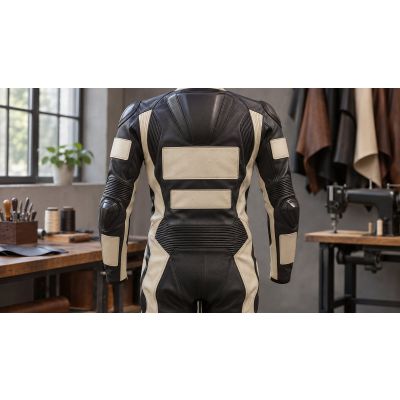
Short answer: In the MotoSpeeds designer, you can add up to 26 logos across 14 zones on the suit, plus an optional name and race number in eight possible spots each. Logos come from a searchable library, from your own PNG or JPG upload (up to 5 MB) or as text. Logos are free. The factory applies them as printed leather patches stitched on.
This post covers the Logos and Name steps of the suit designer in detail. For the rest of the process, see our designer guide.
The logo zones
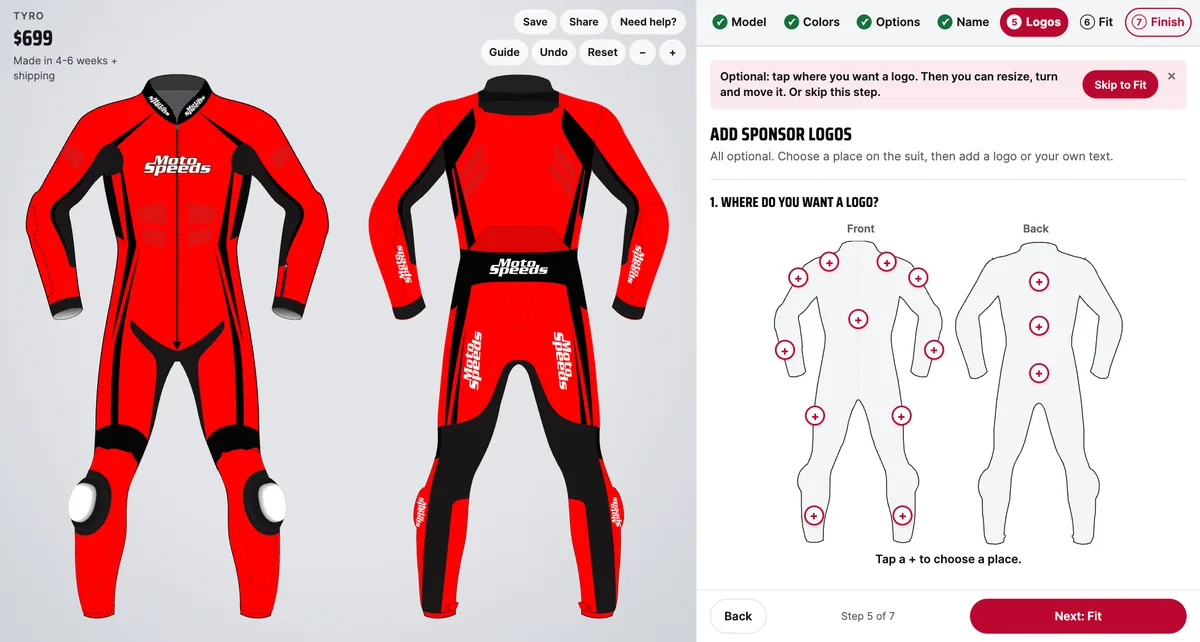
The Logos step shows a clickable front and back outline of the suit. There are 14 zones, and each zone holds a set number of logos. Left and right are the rider's own.
| Side | Zone | Places |
|---|---|---|
| Front | Collar bone right and left | 3 each |
| Front | Upper arm right and left | 3 each |
| Front | Front chest, centre | 3 |
| Front | Forearm right and left | 1 each |
| Front | Thigh right and left | 1 each |
| Front | Shin right and left | 1 each |
| Back | Hump | 2 |
| Back | Back | 2 |
| Back | Lower back | 1 |
That adds up to 26 logos at most. When a zone is full the designer says: "You have added the most logos we can fit. Remove one to add another." Within a zone you can drag a logo, resize it with the size slider, rotate it with the angle slider or remove it. Some zones, such as the upper arms, forearms and outer thighs, can hang over the suit's edge, so check each logo's position.
Three ways to add a logo
1. Sponsor logo library
Search the built-in library by name. It holds more than 900 logos grouped by type: sponsors, riders, manufacturers, teams and race series. Pick a result, then place it in the zone you want.
2. Upload your own
If the logo you need is not in the library, upload it. Only a few rules apply:
- PNG or JPG only, up to 5 MB.
- A logo on a transparent background looks best.
- The file type is checked from its content, not its name.
If the designer says "That file can't be used. Choose a PNG or JPG up to 5 MB.", the file is the wrong type or too large. For safety, every upload is re-processed into a new image, and the original is not kept.
3. Text logos
You can also type text and choose a font and color. Text logos use the same zones and the same 26-logo limit.
How logos are applied
The designer draws a logo straight onto the suit, with no patch outline. In production, the factory applies small logos as printed leather patches stitched on. You do not choose between printing and a patch in the designer. Our staff decide during order review, and you receive a final sketch to approve before production starts. Logos cost nothing extra, so adding one does not change your total.
Name and race number
Name and number are optional and separate from logos. Each has eight locations you can drag the text to.
- Name: back (shoulders), back (lower), chest right, chest left, upper arm right and left, thigh right and left.
- Number: back (middle), back (lower), chest right and left, upper arm right and left, thigh right and left.
Choose from eight fonts: Race, Tall, Heavy, Square, Speed, College, Stencil and Script. These support Latin characters only. The designer shows your name in capitals, as it will be printed.
Planning a layout before you start
With 26 possible logos it is easy to add too many. A simple plan helps.
- List your logos first. Write down the sponsors, your club or team mark and any personal logo, and decide which matter most.
- Match size to zone. The chest and back zones hold up to three or two logos each, while forearm, thigh and shin zones hold only one. Keep tall, narrow logos for the single-place zones.
- Balance front and back. The hump zone is on the back and holds two logos, so the back of the suit is often the most visible place for a rider's main sponsor.
- Keep the name and number clear. Check that a logo does not sit on the same spot as your number.
Preparing an uploaded logo
If you are uploading, a little preparation saves trouble. Save the logo as a PNG on a transparent background where you can, keep the file under 5 MB and make it large enough to look sharp when the designer scales it up. A very small or low-resolution image will look soft once it is resized.
Keeping everything readable
Name, number and logos switch to black or white automatically where the color under them would make them hard to read. You still need to pick colors that work together. How to Choose Race Suit Colors That Look Good and Get Seen covers contrast. Practical tips:
- Give each logo room. Zones that hold three logos get crowded quickly.
- Use the preview zoom to check small logos.
- Put the most important sponsor on the chest or back and let smaller marks fill the arms and legs.
- Use a transparent PNG for uploads so the logo's background does not show.
A note on logo rights
The library includes marks from third parties. Only add logos you have permission to use, and use Upload for your own sponsors. We do not describe any logo in the designer as licensed or endorsed, and the same goes for the replica designs. If you are choosing a bike-inspired look, see Replica Race Suits: Design a Suit to Match Your Bike.
Tips for name and number
Pick a font for readability first and style second. Fonts such as Race and Heavy are bold, while Script is more decorative and better suited to a name than a number. Keep names short, since long names need a small size slider setting to fit. Because the order shows your name in capitals, check spelling before you add the suit to the cart. Name and number also follow the automatic black or white switch, so they stay readable on whichever color sits under them.
FAQ
How many logos can I add?
Up to 26 in total, across 14 zones. Each zone has its own limit.
Do logos cost extra?
No, logos are free.
What file should I upload?
A PNG or JPG up to 5 MB. A logo on a transparent background looks best.
Can I choose between printed and patch logos?
No. You do not choose in the designer. The factory applies logos as printed leather patches stitched on, and our staff confirm the method during order review.
Are name and number free?
The designer's option list has no price for a name or number, and logos are free. The total in the designer shows exactly what is charged, so you can check as you add them.
Can I see my final design before production?
Yes. We send a final sketch to approve before production, and photos of the finished suit before it ships.
To place your own logos, name and number, open the suit designer and go to the Logos step.